

Stock changeover
Prices are going up. Ours are going down.
We are expanding the range of manufacturers we carry, and are changing over our stock. The yen keeps weakening and imported goods keep getting more expensive — but the stock we are holding now goes out at 70% off.
The reduction is a matter of inventory, not of quality. Items bought on sale carry the same setup support and manufacturer warranty as any other. We remain available for questions after your purchase, exactly as before.
Two items or more: a further 1,000 JPY off. The device and the backup are separate things — with only one of them, losing that one puts the assets out of reach.
See the product range-

SecuX V20
A stationary model that allows you to review the recipient on a large screen before approving the transfer. For those who use it on a desk.
¥5,940¥19,80070%OFF
5 left
View details -

SecuX W20
Palm-sized at 62g. With the same internal safety as the V20, it's perfect for those on the go.
¥5,040¥16,80070%OFF
5 left
View details -

SecuX Nifty
A collector-focused device that lets you view purchased NFTs on its screen.
¥8,520¥28,40070%OFF
3 left
View details -
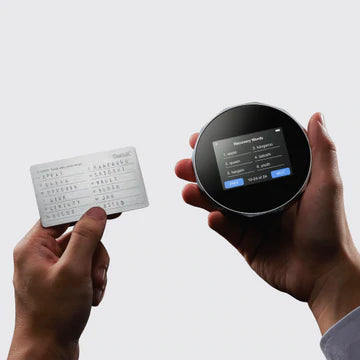
X-SEED PLUS
Engrave and store your recovery passphrase on a metal plate. This can be used instead of writing it on paper.
¥2,490¥8,30070%OFF
2 left
View details -

X-SEED PRO
A heavy-duty version of PLUS. Made of thick stainless steel, ensuring readability even after fires or floods.
¥3,780¥12,60070%OFF
View details


Self-custody store
The most surefire method is not to deposit it.
Protect your crypto assets and stablecoins yourself, without entrusting them to exchanges or external custodians. We offer consultations, both online and in-person, from establishing corporate systems to long-term personal storage.
English support available — residents of Japan only.
Choosing a cold wallet
Keep the key on a device that is off the network, and confirm every transfer with your own eyes before approving it. We stock only the hardware that makes that routine practical to keep up.
Pairing
An everyday device, and a last resort
SecuX V20 is the larger unit, built to sit on a desk. The SecuX W20 weighs 62g and travels with you. The security inside is identical, so choose by where you will use it.
The words that recover your assets if the device fails, stamped into a metal plate rather than written on paper. X-SEED PLUS / PRO handle that job.
The device and the backup are separate things. With only one of them, losing that one puts the assets out of reach.
Criteria
Three conditions we require before stocking anything
-
01
A screen large enough to check the address
On a small display you verify an address a few characters at a time. The V20 and W20 show the destination all at once on a 2.8-inch screen. Even if the computer is compromised, you approve only what the device itself displays.
-
02
A key that never leaves the chip
The private key and PIN must be designed so they cannot be read out of the dedicated chip. We require CC EAL5+ as the independent evaluation grade — the level used in IC cards and electronic passports.
-
03
Genuine stock through an authorized channel
For hardware wallets, having the contents swapped in transit or along a resale route is a real threat. We hold an authorized distribution agreement with the manufacturer and hand over genuine stock only.
How it works
The private key never leaves your hands
A cold wallet is not a box that stops you from sending. It receives only the details of the transfer from your computer, you approve it on the device in your hand, and only the signed data goes back. The private key stays inside the device the whole time.
Online side
sends the transfer details
the private key
never crosses this line
returns signed data only
In your hands (offline)
The device and the backup are separate. With only one of them, losing that one puts the assets out of reach.
- 1,000+supported crypto assets
- 500accounts per device
- CC EAL5+independent chip certification
Manufacturer
SecuX
Founded in 2018. Headquartered in Taiwan with offices in Germany and Los Angeles, with a range spanning crypto and NFT storage through to payment terminals. We carry SecuX as an authorized distributor in Japan.
Keep your NFTs in your own hands
An NFT is a record on a blockchain, but what protects ownership of it is the private key. Rather than leaving that key on an exchange or in a software wallet, hold it on a device in your hand. What is true for crypto is true for NFTs.

-
01
See it on the screen
The SecuX Nifty displays the NFTs you hold on a 2.8-inch colour screen. You do not need to open a computer every time you want to look at a piece. It supports Ethereum and several other chains.
-
02
Receive them into the Nifty from the start
For NFTs traded on Ethereum — CryptoNinja and CNP from Ninja DAO among them — setting the receiving address at purchase to the Nifty’s own means the piece is stored and displayed on the device from the outset. No transfer step afterwards, and none of the risk that comes with one.
-
03
Moving NFTs you already hold
NFTs held in MetaMask or another wallet can be displayed by sending them to an address managed by the Nifty. This costs network fees and requires care with the destination address — ask us and we will walk you through it.
Ninja DAO, CryptoNinja and CNP are third-party projects with no connection to this store. Whether a given NFT is supported depends on its chain and standard.
Frequently Asked Questions
What is a hardware wallet?
This device stores private keys in a dedicated terminal disconnected from the internet, preventing them from being exposed. Transaction approvals are performed within the terminal, and the private key itself is not transferred to a PC or smartphone. Even if your computer is infected with malware, the key cannot be extracted.
Can't I just leave it on the exchange?
When assets are held on an exchange, the exchange holds the private keys. In this scenario, you are directly exposed to the risks of operator insolvency or unauthorized access, and if withdrawals are suspended, you cannot move your assets at your own discretion. "Holding your own keys" (self-custody) means breaking free from this reliance.
What happens if I lose my seed phrase?
If your device breaks or is lost, there will be no way to recover your assets. We also cannot recover them for you. This is why planning where and how to store your seed phrase is just as important as choosing the right device. Please consult with us at the time of purchase, including engraving it on a metal plate.
Can corporations implement this?
Yes. We envision this for small and medium-sized businesses and startups establishing their own self-custody systems. We propose a configuration using physical cold wallets, without needing to contract large-scale custodians like BitGo or Fireblocks. We can consult on everything from key management methods that account for staff changes or departures.
Do you provide support in English?
We are able to assist customers in English via in-person service and email. However, sales and support are limited to residents of Japan.
Can I do the initial setup myself?
Although you can generally complete the setup yourself, there are some irreversible steps, such as deciding on your PIN and recording your seed phrase. We offer support for setting up your device, either online or in person, while checking the actual device.
What is a seed phrase?
This is a passphrase used to restore your wallet. It consists of 12 to 24 words. Even if your device breaks, you can recover your assets on another device using this passphrase. Conversely, if others know it, your assets will be stolen. Consider it the key to your safe. The X-SEED products we handle are designed to engrave and store this passphrase on a metal plate instead of paper.
What are Secure Elements and CC EAL5+?
A Secure Element is a specialized semiconductor designed to keep confidential information sealed within the chip, preventing its extraction. CC EAL5+ is a security assurance level, assessed by a third-party organization, indicating how well a chip can withstand attacks. This is the same standard used for IC cards and e-passports. Our policy is to only handle products that meet this level.
What is an NFT?
This is a record that links digital art and items to the statement "this is mine" on the blockchain. Like crypto assets, ownership is protected by a private key. The SecuX Nifty is a model that allows you to view and confirm your NFTs on the device's screen.